How to Move Your Gates Off Hypeddit (Import Guide 2026)
Step-by-step guide to moving your download gates off Hypeddit: export every fan email as one CSV, rebuild your gates free, and repoint your old links.

Quick Answer
Moving your gates off Hypeddit takes one afternoon and loses no data if you do it in the right order: export first, rebuild second, repoint third, cancel last. Hypeddit's export modal has an "all email addresses captured" option that produces a single CSV covering every fan from every gate you have ever run — download that before touching anything else. Then rebuild each gate on Ōtocracy Gates, our own free tool, where the guided import reads your public Hypeddit gate pages and recreates title, artwork, and SoundCloud link automatically, at roughly two minutes per gate. Upload the CSV before you publish the gates, and your fans reattach to them as each one goes live. When I migrated my own account this way, the export came to 2,232 addresses across 13 gates. The one thing that does not transfer is audio — Hypeddit does not let you re-download your files — so have your WAVs or the SoundCloud links ready.
I ran gates on Hypeddit for years — download gates were how the Temple of Sinners edits and the Underkntrl promos got around. So this guide is not theory: it is the exact sequence I used to move my own 13 gates, in order, with the two traps I hit along the way. If you are still deciding whether to move at all, read the Hypeddit vs Ōtocracy Gates comparison or the wider roundup of every live gate tool first; this page assumes you have decided and just want it done clean.
The order matters more than the tools. People lose fan data in migrations because they cancel or unpublish before exporting — do the steps below top to bottom and nothing gets lost.
| Order | Move | Why this order |
|---|---|---|
| 1 | Export your fan CSV | Your list must exist outside Hypeddit before anything changes |
| 2 | Rebuild gates + import | New pages ready before any old link breaks |
| 3 | Repoint your links | Traffic drains while both sets of gates stay live |
| 4 | Wind down Hypeddit | Cancel last, never first |
What Transfers and What Does Not
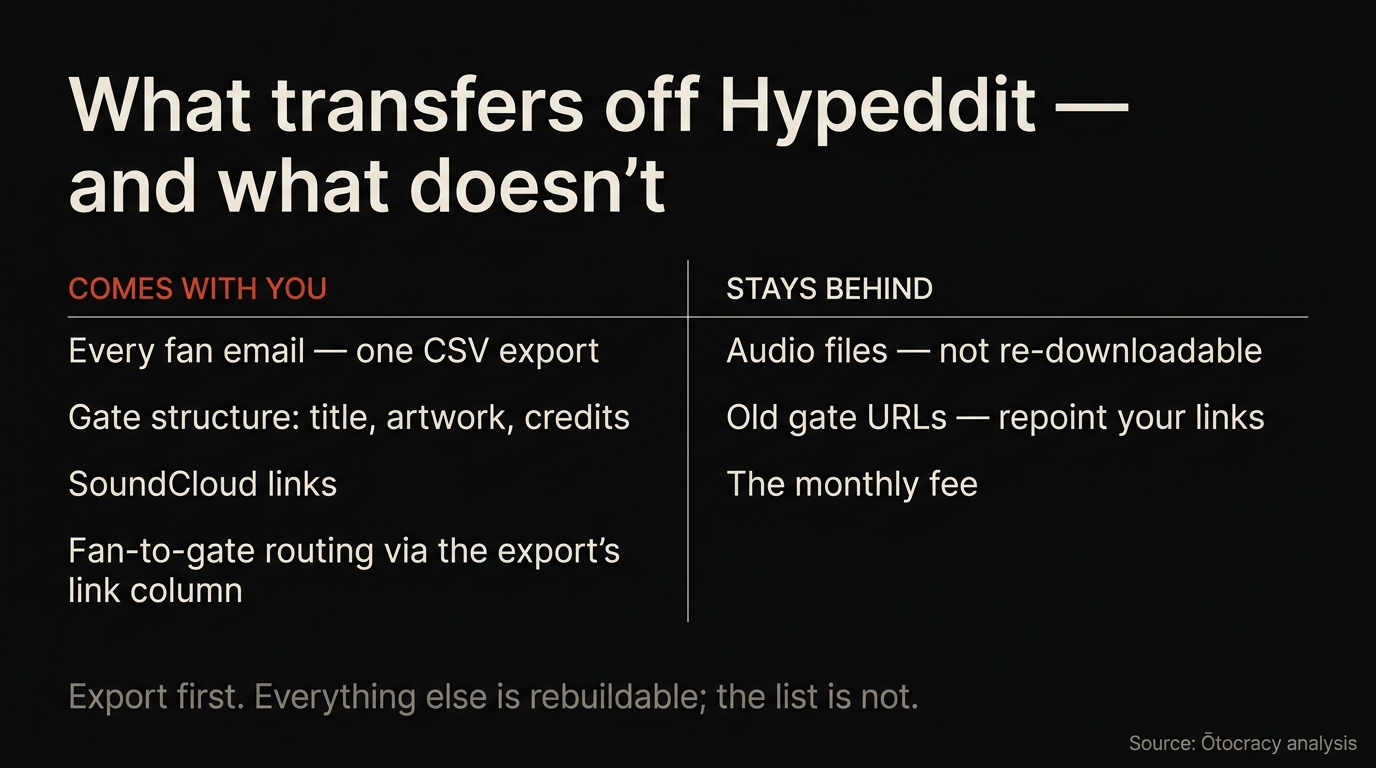
| Asset | Transfers? | How |
|---|---|---|
| Fan emails | Yes — all of them | One CSV via Hypeddit's export, uploaded during import |
| Gate structure (title, artists, artwork, SoundCloud link) | Yes | Read automatically from your public gate pages |
| Which fan came from which gate | Mostly | The export's link column routes fans to their gates |
| Audio files | No | Hypeddit does not offer re-download — use your own files |
| Past follows, likes, reposts | Already yours | They live on the fans' SoundCloud accounts, not in Hypeddit |
| Forced follow/repost steps | No — and not on any other tool either | SoundCloud paused the enforcement API in June 2026; steps import as optional asks |
| Old gate URLs | No, but they can point forward | Update every description and bio link (step 5) |
Step 1: Export Every Fan Email From Hypeddit
In your Hypeddit dashboard, open the email export. The modal gives you a choice of scope — pick "all email addresses captured". This is the single most useful and least obvious option in the product: instead of exporting gate by gate, it produces one CSV with your entire history in it.
The file that comes back has more in it than addresses. Mine contained six columns: the email, the fan's name, a deliverability check result from Kickbox, the capture date, and the title and link of the gate that captured them. Keep all of them — the link column is what lets the import reattach each fan to the right gate later.
Two field notes from my own run. The export endpoint sometimes returns an error on the first attempt when the file is large; retry and it goes through. And do this step even if you are not sure you are leaving — a monthly export of your own list is basic hygiene on any platform, as the artists who lost lists in ToneDen's 2024 shutdown learned the expensive way. Based on 2,400+ campaigns run by our founding team, an owned, exportable fan list is the single asset that survives every platform change — treat the CSV as the deliverable of this whole guide.
Step 2: List Your Gates and Gather Your Audio
Write down the link to every live Hypeddit gate you have — from your dashboard, your SoundCloud descriptions, your Linktree. You will paste these into the importer, and afterwards this list becomes your checklist for repointing.
Then collect the audio. This is the one genuine gap in any Hypeddit migration: your uploaded files are not re-downloadable from their system. You have three options per gate: re-attach your own WAV or MP3 from your archive, let the importer pull the SoundCloud original — which only works if you have downloads switched on for that track, otherwise it stops and asks you for the file — or treat the migration as the moment to swap in a fresh VIP or extended edit, which is what I did on four of mine.
Step 3: Run the Guided Import
Create a free account at Ōtocracy Gates — Ōtocracy is our own company, which is exactly why I ran my own account through this before writing it up. Then open the guided import, which runs in three steps, in this order.
Step 1, your gates. Paste your gate links from step 2 above, up to 30 at a time. The importer reads each public Hypeddit gate page and stages a rebuilt version — track title, artist credits, artwork, SoundCloud link, prefilled. Nothing is live yet.
Step 2, your fans. Upload the CSV from step 1. This has to happen before you bring gates live, because attaching fans is part of publishing each gate — commit first and you get live gates with an empty list. Addresses that Hypeddit's own Kickbox check flagged undeliverable are skipped rather than imported as dead weight. My 2,232 rows went up in one upload.
Step 3, bring them live. Now you work the queue gate by gate. Each one needs two decisions: tick the rights attestation (the importer refuses to publish without it), and choose the fan scope — "only this track's fans" is the default and the right answer if your export carried the Link column, since that is what routes each fan to the gate they actually came from. Every imported contact is tagged as imported and keeps a one-click unsubscribe. Gates you skip stay skipped, and imported gates arrive unlisted, so nothing appears publicly until you say so.
One thing that surprises people mid-import: the follow, like, and repost steps come across as optional asks rather than requirements. That is not the importer being lossy — SoundCloud paused the enforcement API for every gate tool in June 2026, so no tool can require them anymore.
Step 4: Spot-Check Three Gates Like a Fan
Before repointing anything, open three of your new gate pages in a private browser window and walk through them as a fan would: enter an email, confirm it, download the file. You are checking the artwork rendered, the right file delivers, and the confirmation mail arrives fast.
This ten-minute check is also your first look at the analytics view — visits, unlocks, and downloads per gate — which is where you will later see which posts and descriptions actually drive traffic.
Step 5: Repoint Every Old Link
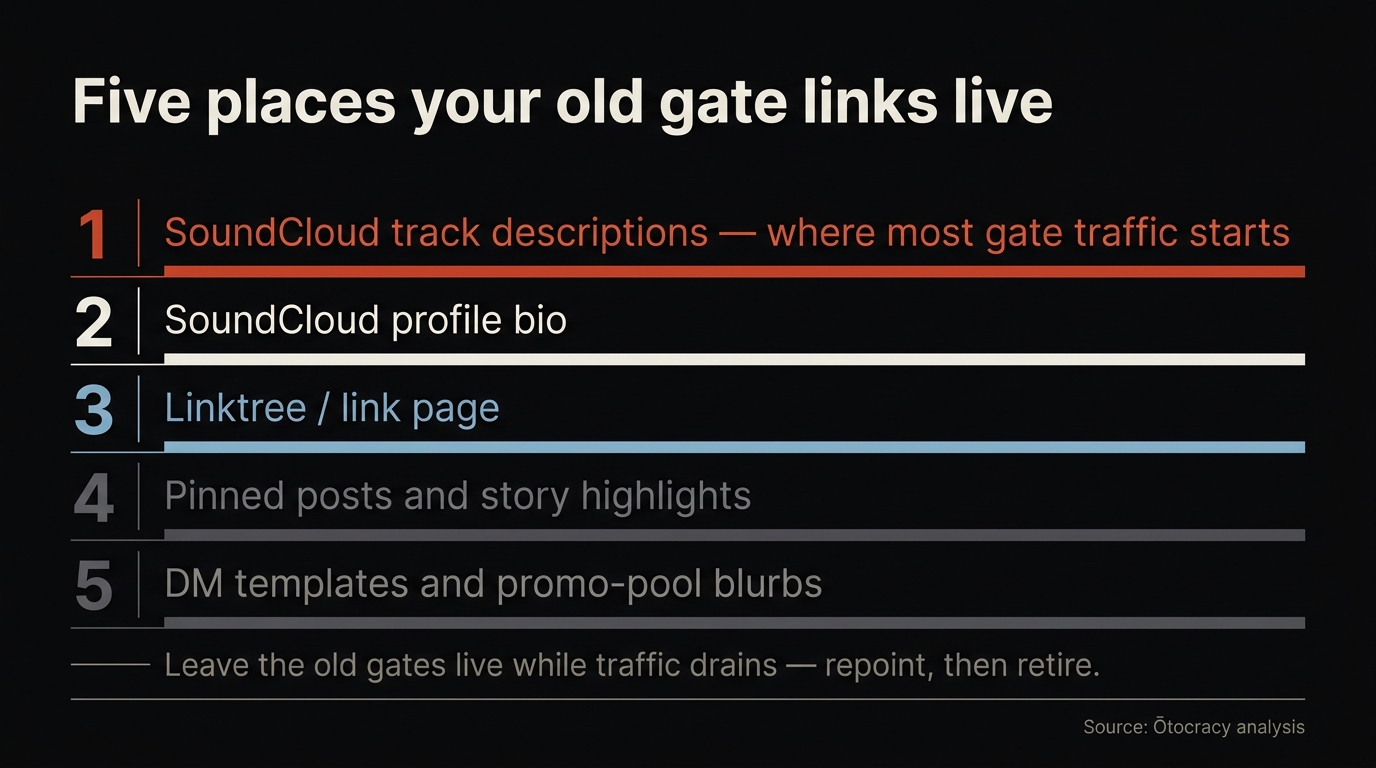
Now work through the list from step 2 and replace the old gate URL everywhere it lives:
- Every SoundCloud track description — this is where most gate traffic originates
- Your SoundCloud profile bio
- Linktree or your link page
- Pinned posts and story highlights on Instagram and TikTok
- Any DM templates or promo-pool blurbs you reuse
Leave your Hypeddit gates live while you do this — there is no reason to break links mid-switch. Traffic drains to the new pages as the descriptions update.
Step 6: Wind Down Hypeddit Deliberately
After a week or two, check your Hypeddit dashboard: if gate visits have gone to zero, the repointing is complete. Export your CSV one final time to catch any fans who came through during the transition, upload the fresh rows, and only then unpublish the old gates and cancel any paid plan. Cancel-first is how people orphan their own data — always the last step, never the first.
After the Move: Make the List Earn Its Keep
The point of owning your fan emails is using them. The weekly digest tells you which gates moved; your CSV drops straight into any mail tool; and once you paste your Meta, TikTok, and Google IDs into each gate's settings — imported gates start with no pixels attached — every fan who unlocks a download also lands in your retargeting audiences. From the booth side I can tell you what the delivery data from 2,400+ campaigns run by our founding team confirms: the crowd that already downloaded your last record is the cheapest audience you will ever put a new one in front of — that is the fan-first sequencing our EDM promotion guide builds every channel around, and it starts with a list nobody can paywall. New to gating entirely? Start with what a download gate is and come back.
Before You Move: Know Your Baseline
Write your numbers down before the migration, not after. Followers, accounts followed, track count, total plays — four figures that take two minutes and make it possible to tell later whether the move helped or whether something else changed.
The 20-minute SoundCloud profile audit is the version of that check we use, with measured benchmarks to place each number against.
Frequently Asked Questions
How do I export all my fan emails from Hypeddit at once?
Open the email export in your Hypeddit dashboard and choose the "all email addresses captured" option. Instead of per-gate files, you get one CSV covering every fan from every gate, with names, capture dates, deliverability results, and the gate each fan came from.
How long does moving off Hypeddit take?
Budget one afternoon. The export takes minutes, the guided import runs about two minutes per gate, and the CSV upload is a single step — my 13 gates and 2,232 fans took well under an hour of actual work. Repointing old links across descriptions and bios is the slowest part.
Do my fans have to sign up again after the import?
No. Uploaded contacts attach to their rebuilt gates as each gate goes live, tagged as imported, and each keeps a one-click unsubscribe. Addresses that Hypeddit's own deliverability check marked undeliverable are skipped during import, so the list you end up with is cleaner than the one you left with.
Can I import my audio files from Hypeddit too?
No — Hypeddit does not offer re-download of uploaded audio, and no importer can change that. Re-attach the files from your own archive, let the importer pull the SoundCloud original where you have downloads enabled on that track, or use the move as an excuse to gate a fresh VIP or extended edit instead.
Will my old Hypeddit links stop working?
They keep working until you unpublish them, which is why repointing comes before winding down. Update your SoundCloud descriptions, bio, and link pages first, leave the old gates live for a week or two while traffic drains, then unpublish once your Hypeddit dashboard shows visits at zero.
The Bottom Line
A migration is only scary when the order is wrong: export, rebuild, repoint, wind down — in that sequence, nothing can get lost, because your fan list is sitting safely in a CSV before you change a single link. Make your free account, then run the guided Hypeddit import once you are signed in, and by tonight your gates are free and your list is yours in a file nobody can put behind a paywall.