Song Not Showing on TikTok? The 2026 Fix List
Your track is released but missing from TikTok, or the sound exists and is not linked to you. The five separate causes, and how to tell which one you have.
Quick Answer
A released track missing from TikTok is almost always one of five separate problems, and they need different fixes. The sound may not exist yet, because distributor delivery to TikTok has not completed or was never switched on. It may exist but not be linked to your artist profile, which is what the Music Tab does — and that requires artist certification plus at least three tracks delivered through your distributor. Your own videos may not be attaching to it, which happens when you add audio to a clip before uploading instead of selecting the track from TikTok's in-app Sound Library. The release may be live in some territories and not yours. Or you may have two competing sounds, usually a pre-release original sound and the official one, splitting every video between them. Work through them in that order, because each check rules out the ones below it.
This is the message I get most often, and it is almost never the thing the artist thinks it is.
"My song isn't on TikTok" describes at least five different failures that look identical from the search bar. Fixing the wrong one wastes a week, and a week matters when a release is already out.
So here is the order I work through it, and what to send your distributor when the answer is that they have to fix it.
First: Which Problem Do You Actually Have?
Two minutes of checking narrows it to one branch.
| What you see | What it means | Section |
|---|---|---|
| Nothing at all when you search title or artist | The sound does not exist yet | Problem 1 |
| Sound exists, but not on your profile | Not linked to your artist account | Problem 2 |
| Sound exists, your clips are not on it | Videos are not attaching | Problem 3 |
| A friend abroad finds it, you cannot | Territory gap | Problem 4 |
| Two sounds with your track on them | Split sound | Problem 5 |
Search from a logged-out or second account as well as your own. TikTok surfaces your own uploads to you in ways it does not to a stranger, which is exactly how people convince themselves a broken sound is fine.
Problem 1: The Sound Does Not Exist Yet
The most common cause and the least interesting: delivery to TikTok has not completed, or was never enabled.
TikTok is a separate delivery from the streaming DSPs. Most distributors handle it automatically now, but some treat it as a toggle or an add-on, and a release can be live on Spotify while the TikTok delivery is still queued or was never selected. Delivery also is not instant — allow several business days after the release date before treating it as broken.
Check your distributor dashboard for TikTok specifically rather than assuming a green light on the release means everything shipped. If TikTok is not listed as a delivered destination, that is your answer and nothing else on this page applies yet.
Problem 2: The Sound Exists But Is Not Linked to You
This is the one that confuses people most, because the track is clearly there — it just behaves like somebody else's.
The Music Tab is the section on an artist profile that collects your official sounds. It is not automatic. It requires artist certification and, in TikTok's own requirements, at least three tracks delivered to TikTok through your distributor. An artist with one single out will not see a Music Tab no matter how correct everything else is, and that is working as designed rather than a fault.
If you clear the threshold and the tab still is not there, or tracks are on TikTok but missing from the tab, the route is a linking request through TikTok's Artist Feedback form. Include your profile link and the specific releases.
The other frequent cause here is metadata drift. Your artist name, track title and any featured-artist fields have to match across your distributor, the DSPs and your TikTok profile. A stray "prod. by", a different capitalisation of a feature credit, or a distributor tag in the artist field is enough to stop the systems recognising that two things are the same artist.
Problem 3: Your Videos Are Not Attaching to the Sound
The sound is fine, your clips just are not landing on it. This one is entirely self-inflicted and entirely fixable.
Always select the track from TikTok's in-app Sound Library when you post. If you cut the audio into your video in an editor and upload the finished file, TikTok has no reason to connect that clip to your official sound. It reads as a video with baked-in audio, and it contributes nothing to the page that actually matters.
This is worth telling every creator you work with, in writing, every time. It is the single most common reason a paid creator campaign produces videos that do nothing for the sound — the clips exist, the views exist, and the sound page stays empty. We cover what the page is doing and why it is the asset in TikTok sound promotion.
Problem 4: It Works in One Country and Not Yours
Territory gaps are real and they surprise people. A release can be available as a sound in some markets and absent in others, depending on how rights were delivered and cleared.
Test properly before escalating: ask two people in different countries to search it, rather than relying on one friend abroad. If it resolves everywhere except a specific market, that is a rights and delivery question for your distributor and not something you can fix from the app.
For European artists this matters more than the generic advice suggests, because a track that is missing in Germany or the Netherlands is missing in the markets where an EDM record most needs to travel.
Problem 5: There Are Two of Your Sound
The self-inflicted one that costs the most, and the one I see constantly around release day.
If you teased a snippet before release as an original sound from your own upload, you now have two pages carrying your track: the original sound from the teaser, and the official sound from distribution. Videos split between them, and neither accumulates enough to look like anything.
The day the track goes live, move all your posting to the official sound and tell any creator you are working with to do the same. A trend divided across two pages is two dead ends rather than one asset.
What to Send Your Distributor
When it is genuinely their side, a vague ticket gets a vague answer. Send all of this in the first message:
- Your TikTok profile link
- The exact release title and UPC or ISRC
- The release date and the date TikTok delivery was requested
- What you searched and from which account and country
- Screenshots of the search returning nothing, or of the wrong-looking sound
- Whether you have three or more tracks delivered, if the issue is the Music Tab
That is the set that lets them escalate to TikTok on your behalf without a round trip. Across the 2,400+ campaigns run by our founding team, the difference between a two-day fix and a three-week one is almost always whether the first message contained the identifiers.
How Long Each Fix Actually Takes
Useful for deciding whether to hold a release push or work around it.
| Problem | Who fixes it | Realistic timeline |
|---|---|---|
| Delivery not completed | Distributor | Several business days from delivery |
| Music Tab missing, under three releases | Nobody — it is a threshold | Until your third release ships |
| Music Tab missing, three or more | TikTok, via Artist Feedback form | Days to weeks |
| Metadata mismatch | Distributor, then re-delivery | Days to weeks |
| Videos not attaching | You, immediately | Same day |
| Territory gap | Distributor and rights side | Weeks, sometimes unresolved |
| Split sound | You, immediately | Same day |
Two of the seven you can fix yourself in an afternoon, and those two are the ones most artists escalate to somebody else. Everything involving delivery or linking runs on somebody else's queue, which is the argument for checking all of this before a release rather than after.
Across the 2,400+ campaigns run by our founding team, the releases that go smoothly are the ones where somebody opened TikTok and searched the track the day it went live, not the week the campaign was meant to start.
Do Not Post the Campaign Until It Resolves
The instinct when a release is live and the sound is broken is to push anyway and fix it later. That is the expensive choice.
Every clip posted while the sound is missing, unlinked or split is spend that cannot be recovered — the views happen, the page does not build, and you cannot retroactively move videos onto the right sound. Hold the campaign, fix the plumbing, then run it.
And if you are choosing who to buy from once it is fixed, the services comparison covers the six realistic options with verified pricing.
If you are unsure whether the release is ready for a push at all, the free audit reads where your listeners are actually coming from, and our TikTok campaigns run the seeding side once the sound is behaving.
Frequently Asked Questions
Why is my song not showing up on TikTok?
Most often distributor delivery to TikTok has not completed or was never enabled, since TikTok is a separate delivery from the streaming DSPs. Allow several business days after release before treating it as a fault, and check that TikTok is listed as a delivered destination in your distributor dashboard.
Why is there no Music Tab on my TikTok profile?
The Music Tab requires artist certification and at least three tracks delivered to TikTok through your distributor. With fewer than three delivered releases it will not appear, which is expected rather than broken. Past that threshold, submit a linking request via TikTok's Artist Feedback form.
Why are my videos not appearing under my own sound?
Because the audio was added before upload rather than selected in the app. Always pick the track from TikTok's in-app Sound Library when posting — a clip with baked-in audio is not connected to your official sound and adds nothing to the page.
My song is on TikTok in another country but not mine. Why?
Rights and delivery are handled per territory, so a track can be live as a sound in some markets and absent in others. Confirm with people in two different countries before escalating, then take it to your distributor as a territory question.
Should I delete my pre-release original sound?
Do not rely on deleting it — move your posting to the official sound the day the release lands and direct any creators to the same page. The risk with a teaser sound is that it splits videos across two pages, and consolidating your activity is what fixes that.
How long should I wait before contacting my distributor?
Several business days after the release date for the sound to appear at all. If it is still missing after that, or if the Music Tab has not appeared once you have three or more releases delivered, raise it with the identifiers listed above rather than a general description.
The Bottom Line
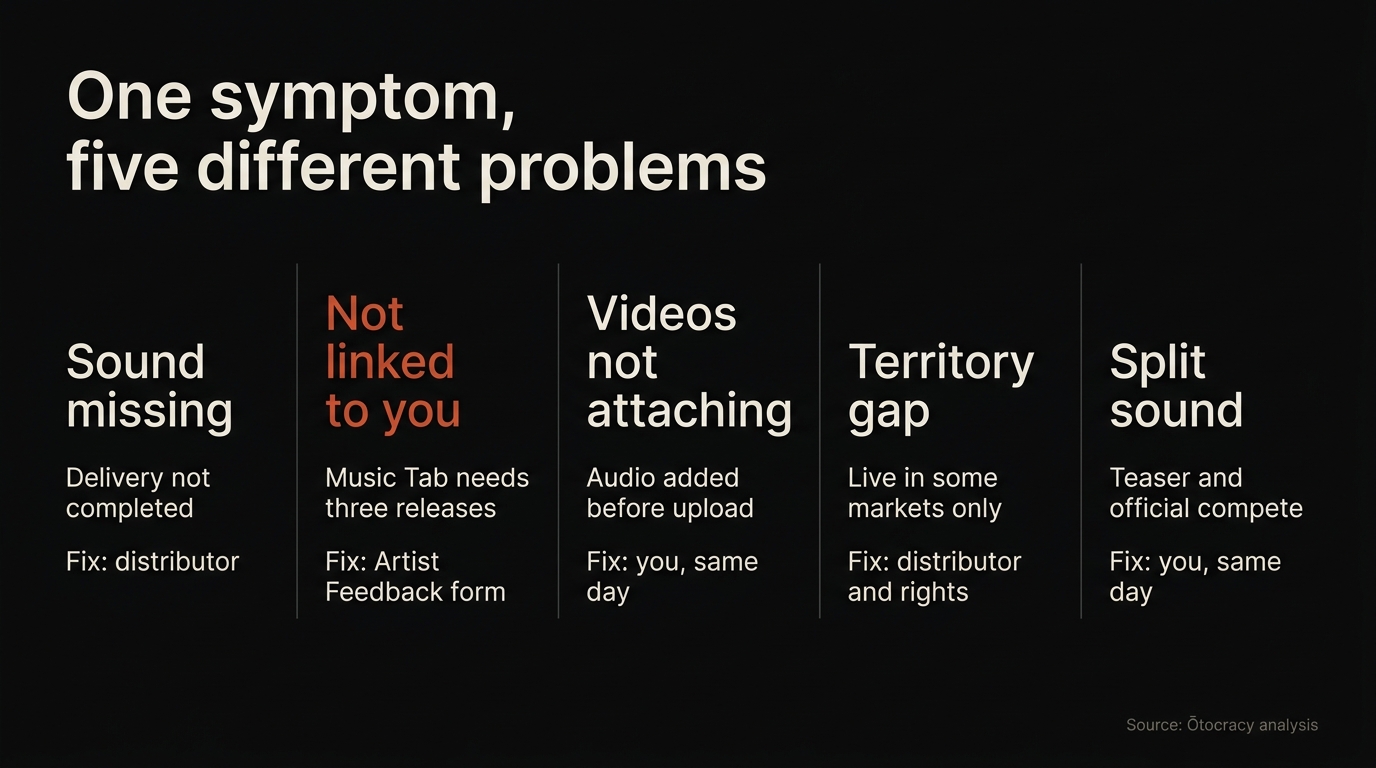
Five different problems, one symptom. The order matters because each check rules out the ones under it: does the sound exist, is it linked to you, are your videos attaching, is it a territory gap, and is there more than one of it.
Work down that list before you spend anything on promotion, because a campaign run against a broken sound is money you cannot get back.
Once it is behaving, TikTok sound promotion covers how to seed it, and the complete TikTok music promotion guide puts it in the wider release picture. The streaming side of the same launch is in how to release a song on Spotify.